Showing posts with label Sql server Interview Questions. Show all posts

Difference between DELETE and TRUNCATE commands in SQL

Delete Command removes the row from the table based on the condition that we provide with a WHERE clause. TRUNCATE will actually remove all the rows from a table an there will be no data in the table after we run the truncate command.

Difference between TRUNCATE and DELETE in SQL

TRUNCATE in SQL
  • TRUNCATE removes all the rows from a table, but the table structure, its columns,  constrains, indexes and so on remains. The counter used by an identity for new row is reset to the seed for the column.
  • TRUNCATE is DDL Command.
  • TRUNCATE resets identity of the table.
  • TRUNCATE cannot be rolled back unless it is used in TRANSACTION.
  • TRUNCATE is faster and uses fewer system and transaction log resources than DELETE.
  • You cannot use TRUNCATE TABLE on a table referenced by a FOREIGN KEY constraint. Because TRUNCATE TABLE is not logged, it cannot activate a trigger.

Syntax for TRUNCATE in SQL
TRUNCATE TABLE table_name

DELETE in SQL

DELETE can be used with or without a WHERE clause
DELETE is DML Command.
DELETE doesn't resets identity of the table.
DELETE can be rolled back
DELETE removes rows one at time and records at entry in the transaction log for each deleted row
DELETE  Activates Trigger.

Syntax for DELETE in SQL
DELETE FROM table_name

Truncate and Delete video tutorial

How to Alter Datatype in Sql Server


ALTER TABLE is one of the most useful statement in Sql Server. Its used to add, delete, or modify columns in an existing table. By using alter table statement we can easily alter datatype in Sql Server. Let see the statement with  examples.

Example for alter datatype in sql server

USE tempdb
CREATE TABLE dbo.Employee
(EmpID INT, Name VARCHAR(10), LastName DATETIME)

use sp_help 'Employee' to check datatype details

Example for alter datatype in sql server


Example for alter datatype INT to varchar
ALTER TABLE dbo.Employee
ALTER COLUMN EmpID VARCHAR(100)

Example for alter datatype INT to varchar


Example for alter datatype varchar to Int
ALTER TABLE dbo.Employee
ALTER COLUMN Name int

Example for alter datatype varchar to INT

Example for alter datatype datetime to varchar

ALTER TABLE dbo.Employee
ALTER COLUMN LastName VARCHAR(100)

Example for alter datatype datetime to varchar

Sql Statements


SQL is pronounced as "sequel", is a language that is used to manage the database to store, access, and modify data

Data Definition Language (DDL)
It is used to define the database,  data types, structures, and constraints on the data.

Some of the DDL Commands are

  • CREATE is used to create a new database objects such as table
  • ALTER is used to modify the database objects
  • DROP is used to delete the objects

Data Manipulation Language (DML)
It is used to manipulate the data in the database objects.

Some of the DML commands are

  • INSERT is used to insert a new data record in a table 
  • UPDATE is used to modify an existing record in a table
  • DELETE is used to delete a record from a table 

Data Control Language (DCL)
It is used to control the data access in the database

Some of the DCL Commands are

  • GRANT is used to assign permissions to user to access a database object
  • REVOKE is used to deny permission to users to access a database object

Data Query Language (DQL)
It is used to query data from the database objects SELECT is the DQL command that is used to select data from the database in different ways abd formats

Different types of joins in sql server

Sql joins are used to retrieve data from multiple tables. Joins allow you to view data from related tables in a single result set. Depending on the requirements to view data from multiple table, you can apply different types of joins, Such as inner join, cross join, equi join or self join

Examples Table for joins


Tables for Joins


The Different Types of Joins in SQL Server
  • Inner join or Equi join
  • Self Join
  • Outer Join
  • Cross join
Using an Inner join (Equi Join)

An inner join retrieves record from multiple tables by using a comparison operator on a common column. When an inner join is applied, only rows with values satisfying the join condition in the common column are displayed


Inner Join


Example for Inner Join 
SELECT Stud.Studid,Stud.StudFirstName,Stud.StudLastName, Dept.DepartmentName 
FROM Student Stud  INNER JOIN Department dept ON Stud.Departmentid=Dept.Departmenttid

Output for  Inner Join


Example for Inner Join


Using an Self Join 
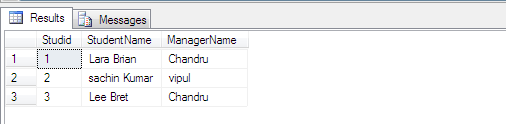
In a self join a table is joined with itself. As a result, one row in a table correlates with other rows in the same table.

Example for Self Join 
SELECT Stud1.Studid,Stud1.StudFirstName+' '+Stud1.StudLastName as StudentName, 
Stud2.ManagerName as ManagerName   FROM Student Stud1 
INNER JOIN Student Stud2  ON Stud1.Departmentid=Stud2.Studid

Output for Self Join:


Example for Self Join


The Outer join can be of three types
  • Left Outer Join
  • Right Outer Join
  • Full Outer Join
Using an Left Outer Join


A left outer join returns all rows from the table specified on the left side of the LEFT OUTER JOIN keyword and the matching rows are not found in the table specified on the right side, NULL values are displayed in the column that get data from the table specified on the right side

Left Outer Join


Example for LEFT OUTER JOIN :
SELECT Stud.Studid,Stud.StudFirstName,Stud.StudLastName, Dept.DepartmentName 
FROM Student Stud  LEFT OUTER JOIN Department dept ON Stud.Departmentid=Dept.Departmenttid

Output for LEFT OUTER JOIN :

Example for LEFT OUTER JOIN


Using an Right Outer Join
A Right outer join returns all rows from the table specified on the right side of the RIGHT OUTER JOIN keyword and the matching rows from the table specified on the left side


Right Outer Join


Example for RIGHT OUTER JOIN
SELECT Stud.Studid,Stud.StudFirstName,Stud.StudLastName, Dept.DepartmentName 
FROM Student Stud  RIGHT OUTER JOIN Department dept ON Stud.Departmentid=Dept.Departmenttid


Output for RIGHT OUTER JOIN:

Example for RIGHT OUTER JOIN


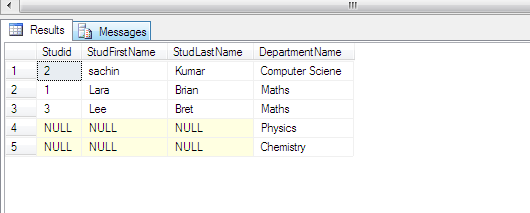
Using an FULL OUTER JOIN 
A Full outer join is a combination of left outer join and right outer join. This join returns all the matching and non matching rows from both the tables. However, the matching records are displayed only once. In case of non-matching rows, a NULL value is displayed for the columns for which data is not available


FULL OUTER JOIN

Example for FULL OUTER JOIN
SELECT Stud.Studid,Stud.StudFirstName,Stud.StudLastName, Dept.DepartmentName 
FROM Student Stud  FULL OUTER JOIN Department dept ON Stud.Departmentid=Dept.Departmenttid

Output for FULL OUTER JOIN


Example for FULL OUTER JOIN


Using an Cross Join 
A cross join, also know as Cartesian product, between two tables join each row from one table with each row of the other table

Example for Cross Join
SELECT Stud.Studid,Stud.StudFirstName,Stud.StudLastName, Dept.DepartmentName  
FROM Student Stud CROSS JOIN Department dept

Output for Cross Join


Example for Cross Join


Tutorial for Sql Joins


Creating Xml in Stored Procedure using FOR Xml Path

I always like to create xml in Stored Procedure because its one of the simplest and fastest method, within a fraction of second it must form an xml,  no need to loop through the dataset or datable in C#. Lets go over and start with simple example to create Xml in stored procedure using FOR Xml Path

Create and sample Employee Table 

 CREATE TABLE [dbo].[Employee]
( [ID] [int] IDENTITY(1,1) NOT NULL,
[EmpName] [varchar](50) NULL,
[Address] [varchar](100) NULL,
 [PhoneNo] [varchar](50) NULL ) ON [PRIMARY]

Insert Some sample values like

  insert into [employee] (EmpName,Address,PhoneNo) values ('Swan','West street','9899434343')

Creating Xml using FOR Xml Path
 declare @result nvarchar(max)
 set @result = (SELECT t.ID,t.EmpName, t.Address, t.PhoneNo FROM employee t FOR XML
 PATH('Employee') ) select @result as Result
   
  Output : 
<Employee><ID>1</ID><EmpName>Swan</EmpName><Address>West street</Address><PhoneNo>9899434343</PhoneNo></Employee>

  Creating XML in STORED Procedure using FOR Xml Path

DELETE, TRUNCATE, DROP and RESEED Identity in Sql Server


Now we are going to see the most 4 important queries in Sql Server DELETE, TRUNCATE, DROP and RESEED. After a long time now only i come to know there is way to increase the identity value using RESEED . Let see the example's of Delete, Truncate, Drop, Reseed identity

 Create a sample Employee Table 

 CREATE TABLE [dbo].[Students]( [ID] [int] IDENTITY(2,1) NOT NULL,
 [StudName] [varchar](50) NULL,
 [Address] [varchar](100) NULL,
 [PhoneNo] [varchar](50) NULL ) ON [PRIMARY]

  Inserting values in the Students table

   insert into [Students] (StudName,Address,PhoneNo)
   values ('vishuva','swiss bridge street','8899434343')

 Output

insert values in table
Note: Check now the seed value is 2

DELETE QUERY

DELETE query is to delete rows in table without WHERE clause it will delete all the rows. However, when a new record is inserted the identity value is increased from 2 to 3. It does not reset but keep on increasing.

 DELETE FROM Students 

Output

  Delete Query in Sql Server

 TRUNCATE Query
 Truncate will remove all the rows in the table. TRUNCATE resets the identity value. However, when a new          
  record is inserted the identity value is same as original seed value of the table.

 insert into [Students] (StudName,Address,PhoneNo) values ('vishuva','swiss bridge street','8899434343')

Output 

  insert values in table

RESEED Query 

RESEED identity is used to set seed value to the table . Already we set the seed value as 2 in the above examples. Now we are going to set the seed value to 1 DBCC CHECKIDENT ('Students', RESEED, 1)

Output

Reseed identity in Sql Server
Drop Table Query

 Drop Table to delete the entire table DROP TABLE Students